

Test and compare your material properties
Original research topic: https://community.preciousplastic.com/research/3d-printer-plastics-scientific-tests--properties As Precious Plastic grows to more advanced products and accurate machines, understanding the properties of the plastic becomes increasingly important. Currently, the database of melting temperatures and performances of the different materials is out of date and lacks valuable information for product designers. As a result, Sustainable Design Studio will be developing a series of standardised tests to understand the properties of different plastics, focusing initially on 3D printer materials.


%20--%3e%3csvg%20version='1.1'%20id='Layer_1'%20xmlns='http://www.w3.org/2000/svg'%20xmlns:xlink='http://www.w3.org/1999/xlink'%20x='0px'%20y='0px'%20viewBox='0%200%2044.6%2043.9'%20style='enable-background:new%200%200%2044.6%2043.9;'%20xml:space='preserve'%3e%3cstyle%20type='text/css'%3e%20.st0{fill:%231D1D1B;}%20%3c/style%3e%3ctitle%3eicon%20time%20needed%3c/title%3e%3cg%20id='Calque_1'%3e%3cpath%20class='st0'%20d='M20.5,0.5c-5.8,1.1-11,4.2-14.7,8.7c-3.4,4.3-6.3,11.5-5.7,17.1C1.5,40.9,15,45,27.8,43.6%20c10.3-1.2,17.5-15.5,16.8-25C43.7,7.2,31.9-2.2,20.5,0.5c-1.6,0.4-0.9,2.8,0.7,2.4c11.1-2.6,21.6,7.7,21,18.6%20c-0.3,4.3-1.9,8.4-4.4,11.8c-3.5,4.9-7.2,7.8-13.5,8c-10.6,0.4-22.3-4.4-21.8-17C3.2,13.8,10.8,5,21.1,2.9%20C22.7,2.6,22,0.2,20.5,0.5z'/%3e%3cpath%20class='st0'%20d='M19.9,6.7c0.1,5.2,0.4,10.5,0.9,15.7c0.1,1.6,2.6,1.6,2.5,0c-0.5-5.2-0.8-10.4-0.9-15.7c0-0.7-0.6-1.2-1.2-1.2%20S19.9,6,19.9,6.7z'/%3e%3cpath%20class='st0'%20d='M21.2,23.3c2.1,1.8,4.3,3.4,6.6,4.9c1.4,0.8,2.7-1.4,1.3-2.1c-2.1-1.3-4.2-2.8-6.1-4.5%20C21.7,20.6,20,22.3,21.2,23.3L21.2,23.3z'/%3e%3c/g%3e%3c/svg%3e) < 1 week
< 1 week Easy
Easyinjection
%20--%3e%3csvg%20version='1.1'%20id='Calque_1'%20xmlns='http://www.w3.org/2000/svg'%20xmlns:xlink='http://www.w3.org/1999/xlink'%20x='0px'%20y='0px'%20viewBox='0%200%2027.2%2027.8'%20style='enable-background:new%200%200%2027.2%2027.8;'%20xml:space='preserve'%3e%3ctitle%3eicon%20redirect%20new%3c/title%3e%3cg%3e%3cpath%20d='M27.2,26.5c-0.1-5-0.3-10-0.4-15c0-0.7-0.6-1.2-1.2-1.2s-1.2,0.6-1.2,1.2c0.1,4.6,0.3,9.1,0.4,13.7%20c-3.9-0.2-7.7-0.6-11.6-0.4c-3.3,0.2-6.7,0.5-10,0.4C2.8,19.5,2.7,13.7,2.5,8c2.9-0.1,5.8-0.8,8.6-0.7c1.6,0.1,1.6-2.4,0-2.5%20C7.8,4.6,4.5,5.7,1.2,5.5c-0.6,0-1,0.3-1.1,0.7C0,6.3,0,6.4,0,6.6c0,0,0,0.1,0,0.1c0,0,0,0,0,0.1c0.2,6.6,0.4,13.2,0.5,19.7%20c0,0.6,0.4,1.3,1.2,1.4c3.8,0.1,7.5-0.2,11.3-0.4c4.4-0.3,8.6,0.2,12.9,0.4c0.6,0,1-0.3,1.1-0.7C27.1,26.9,27.2,26.7,27.2,26.5z'/%3e%3cpath%20d='M12,12.6c-0.2,0.7,0.2,1.4,0.9,1.5c0.7,0.2,1.4-0.2,1.5-0.9v0c0.6-2.2,1.4-4.5,3.1-6c1.3-1.2,3-1.9,4.7-2.7%20c-0.4,1.3-0.8,2.6-1.4,3.8c-0.6,1.5,1.8,2.1,2.4,0.7c0.8-1.9,1.5-3.9,2-5.9c0-0.1,0-0.2,0-0.3c0.3-0.6,0.1-1.5-0.7-1.8%20C22.3,0.4,20,0,17.7,0c-0.7,0-1.2,0.6-1.2,1.2s0.6,1.2,1.2,1.2c0.9,0,1.7,0.1,2.6,0.2c-1.7,0.8-3.4,1.7-4.8,3%20C13.6,7.6,12.7,10.1,12,12.6z'/%3e%3c/g%3e%3c/svg%3e)
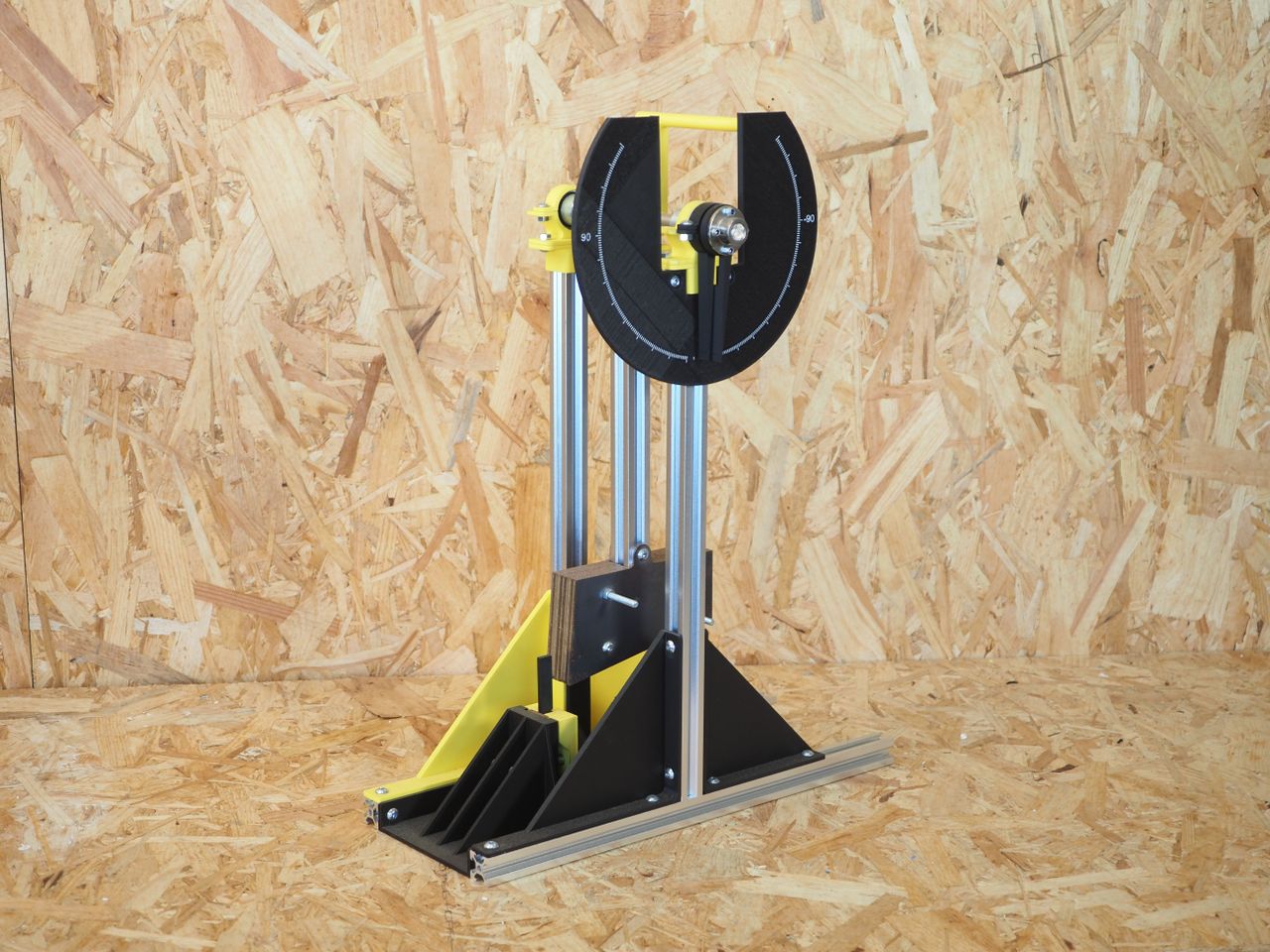
More Information

%20--%3e%3csvg%20version='1.1'%20id='Layer_1'%20xmlns='http://www.w3.org/2000/svg'%20xmlns:xlink='http://www.w3.org/1999/xlink'%20x='0px'%20y='0px'%20viewBox='0%200%2064%2063'%20style='enable-background:new%200%200%2064%2063;'%20xml:space='preserve'%3e%3cstyle%20type='text/css'%3e%20.st0{fill:%23231F20;}%20%3c/style%3e%3cdesc%3eCreated%20with%20Sketch.%3c/desc%3e%3cg%20id='Page-1'%3e%3cg%20id='OA-Logo-Black-Background'%3e%3cpath%20id='Shape'%20class='st0'%20d='M14.1,30.1c-1.5-0.8-8.6-3.8-14.1-7.8c1.8-3.4,3.1-5.6,5-9.1c2.7,1.1,1.9,0.5,4.6,1.7%20c0.8,0.4,10.1,4.5,13.8,6.2c2.4,1.1,4.7,2.2,7,3.3L43,30.5l8.1,3.9c4,2,7.2,3.5,11.3,5.5c0.5,0.3-3.7,9.4-3.7,9.4%20c-1.7-0.6-3.9-1.8-5.5-2.5c-4.7-2.1-9-3.9-13.7-6c-4-1.8-6.7-2.9-10.8-4.5C25,34.9,17.1,31.6,14.1,30.1z'/%3e%3cpath%20id='Shape_1_'%20class='st0'%20d='M12.1,54.9c-0.8,0.6-1.6,1.2-2.5,1.6c-0.4-0.5-0.9-1-1.3-1.5c-0.3-1.2-2.3-4.9-2.7-6.2%20c-0.1-0.4-0.7-2.2-0.8-2.6c0,0,5-3.4,8.2-5.9c3.2-2.6,6.2-5,9.3-7.5c1.4-1.1,3.9-2.5,5.3-3.5c2.5-1.7,13-9.1,15.6-10.5%20c5.4-3.3,11.1-6.3,16.8-9c1.7,3.5,1.8,3,3.8,6.9c0,0-17.8,13.5-22.7,17.1c-3.8,2.8-7.5,5.7-11.3,8.5c-1.7,1.3-3.5,2.4-5.2,3.7'/%3e%3cpath%20id='Shape_2_'%20class='st0'%20d='M20.8,2.9l-0.2-0.8C25,0,31.2-0.3,31.4,0.2c0.4,1.1,0.9,2.2,1.2,3.4c1.4,4.4,2.7,8.7,4,13.1%20c0.4,1.4,2.8,10,2.9,10.5c0.5,2.8,1.2,5.6,1.6,8.4c0.8,4.7,1.4,8.6,2.3,13.3c0.6,3.1,1.3,6.3,2.3,11.3c0,0-5.8,1.4-7.5,1.8%20c-0.8,0.2-1.5,0.4-2.4,0.6c-0.3-1.1-0.2-1.2-0.5-2.1c-0.9-3.7-1.8-7.3-2.6-11c-1.5-6.4-3-12.9-4.4-19.3%20c-1.2-5.4-2.6-10.7-4.4-15.9c-1-3.1-1.8-6.3-2.7-9.5C21.1,3.8,21,3.8,20.8,2.9z'/%3e%3c/g%3e%3c/g%3e%3c/svg%3e)


1
Download and Machine Moulds
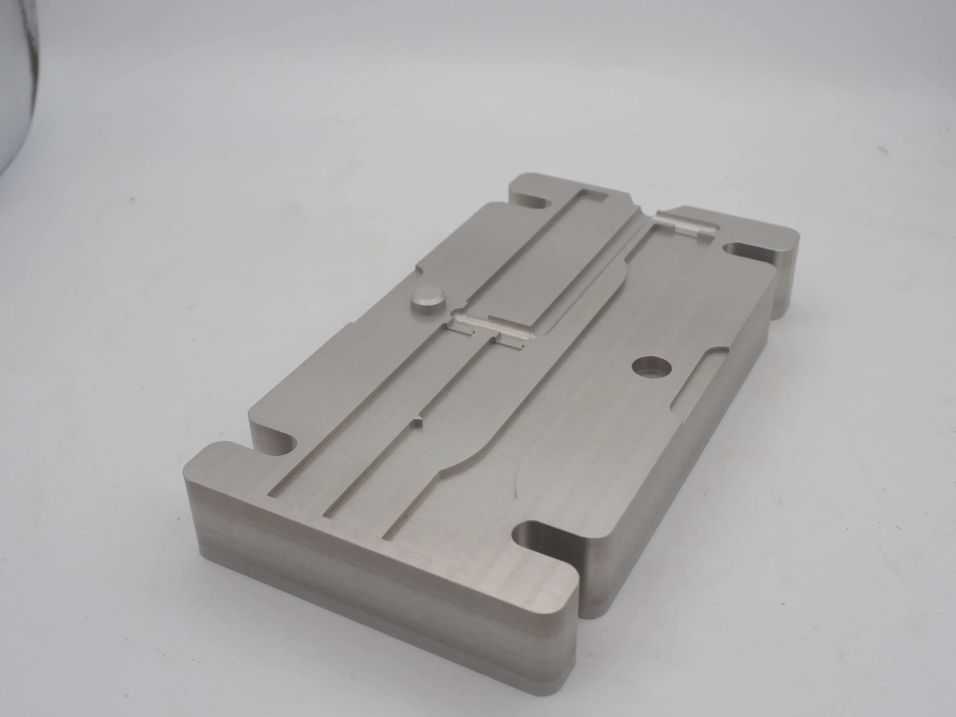
In the .zip folder you will find all the files you will need to machine your own moulds (Part A and Part B) in STEP format.
Please note the STEP file is in "mm".
Additional information:
- Due to the intricacies of the design you will need a R1(mm) ball bit to achieve the precision of this design.
- The moulds should be machined from Aluminium 7075 to ensure long-term durability and strength.
- We recommend the moulds be anodised to achieve a better finish.
- The moulds require:
6pcs M8x80mm
12pcs M8 Washers
6pcs M8 Nuts
2
Creating a Benchmark
After you made your mould and are ready to start your testing, it is useful to create a benchmark to compare your other tests to.
It also comes in especially useful as if you have a benchmark it will be even easier to hop onto another machine or go to a different environment and be able to quickly get up and running.
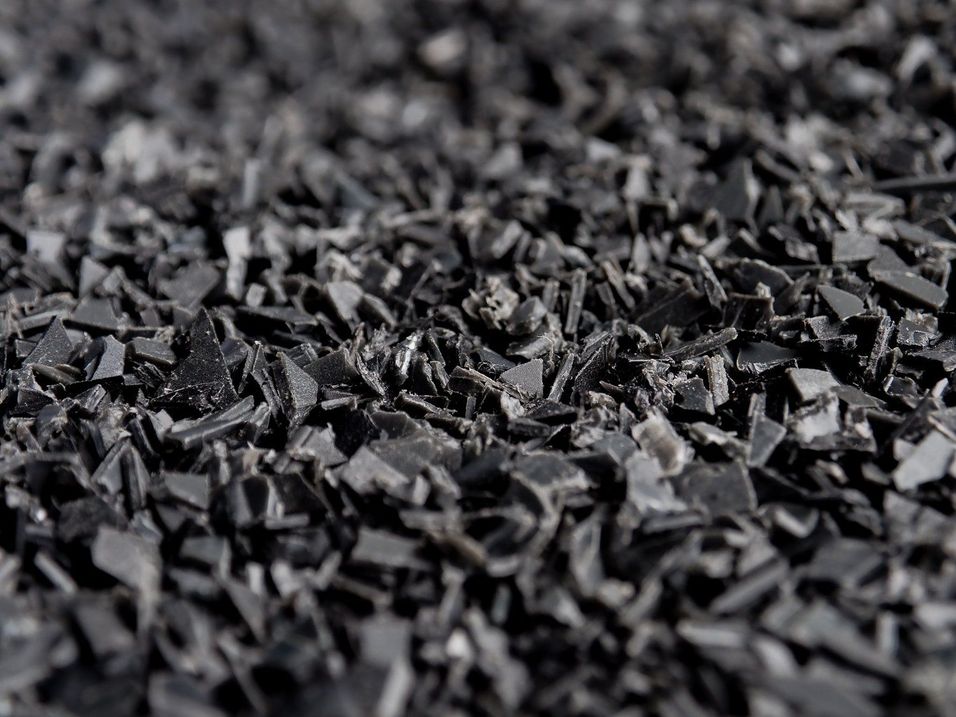
We suggest using black Polypropylene (you can buy some from the bazar here https://bazar.preciousplastic.com/recycle-rebuild), The reason we suggest using black Polypropylene is because of its vast accessibility due to the fact its used for black DVD cases.
3
Flow Test
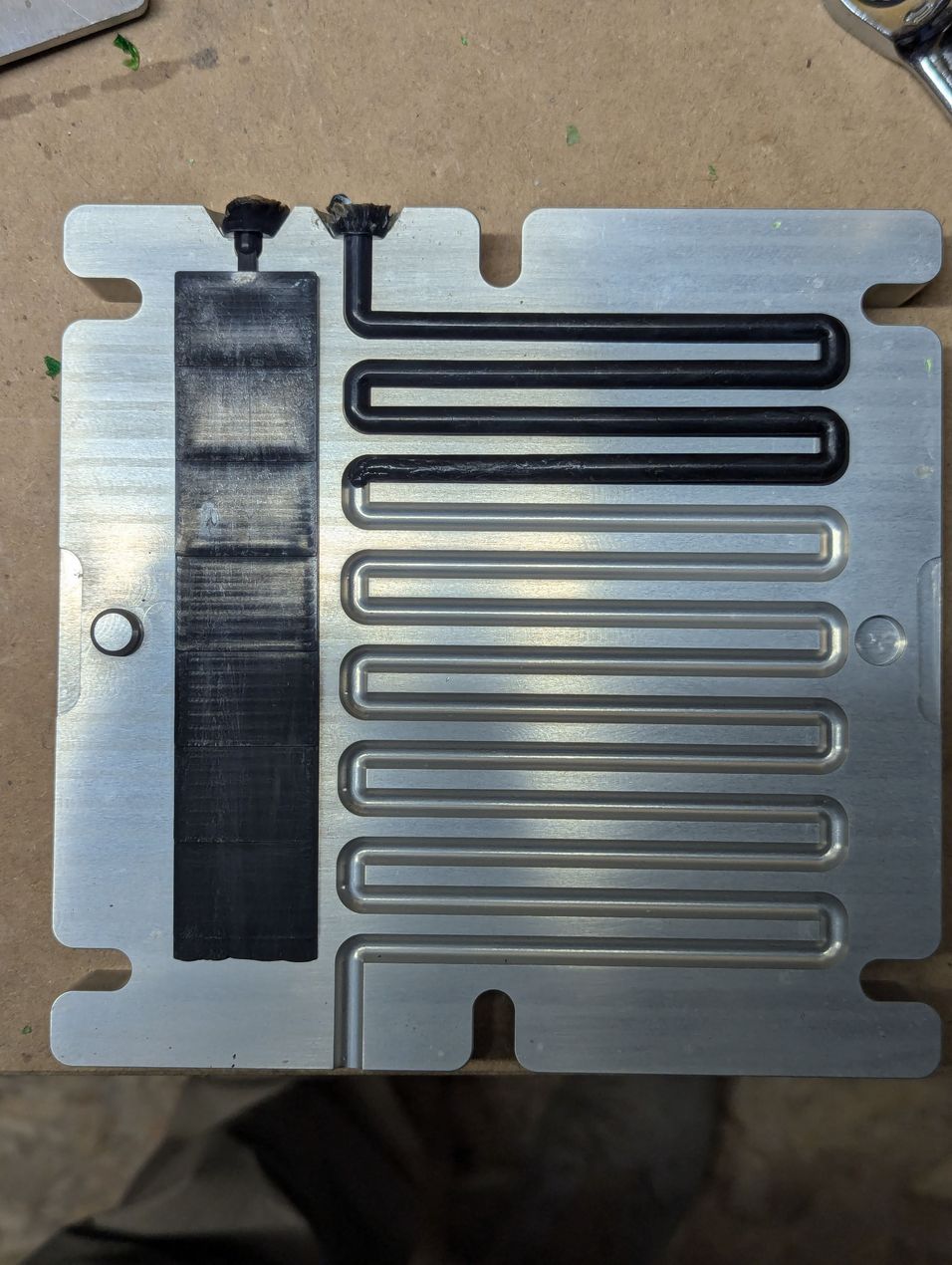
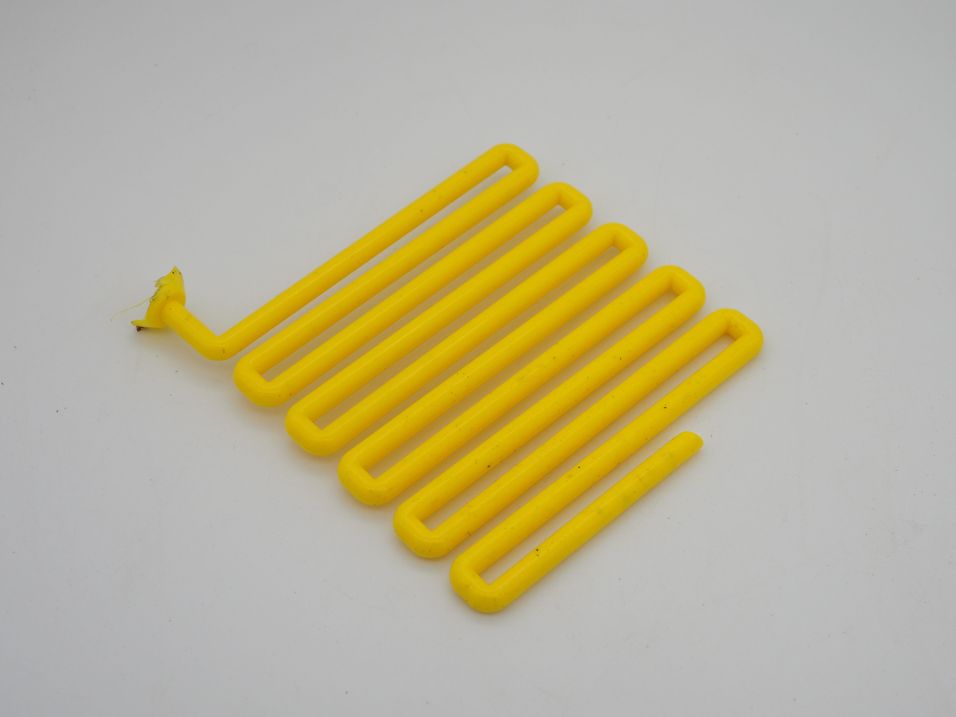
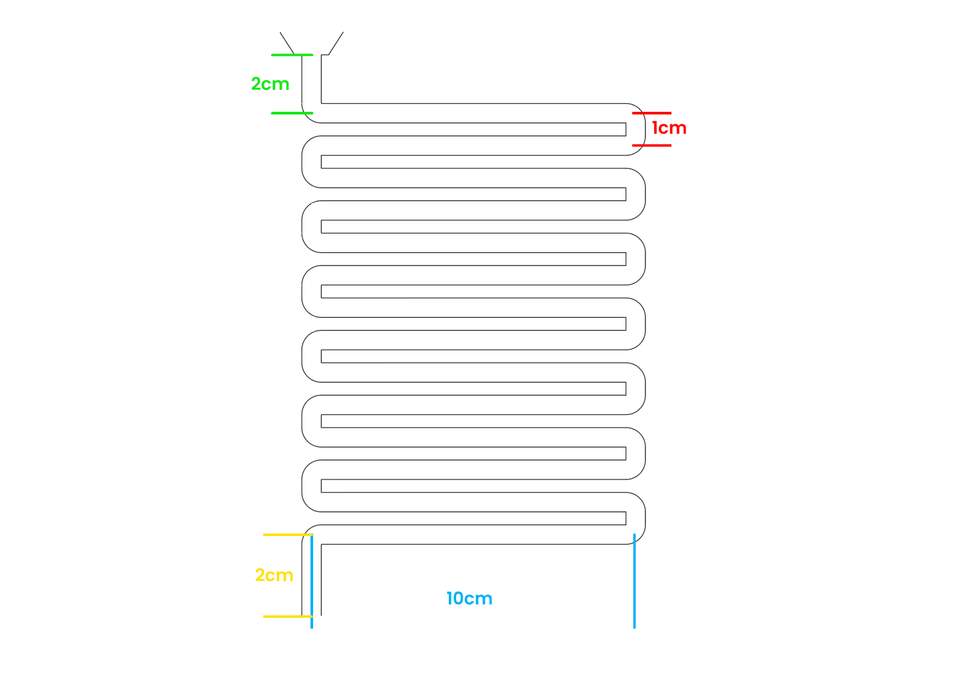
The flow test is the long, wiggly, zigzag cavity. The cavity is 6mm in diameter and 157mm in length.
This test is extremely useful for finding out the limitations of different plastics when it comes to the viscosity and flow.
To measure this result, all you have to do is measure the length of the injection. This is really easy to do, but make sure you have a ruler to hand to help out. The input length is 2cm, each long length is 10cm and each corner is 1cm.
The yellow injection image on the right is 119cm long, for example.
Our benchmark results: 44.5cm
*This mould requires a pneumatic powered injection machine (like the Sustainable Design Studio Injection Mini Machine https://bazar.preciousplastic.com/machines/injection/injection-kits/injection-mini-automatic-injection-kit-pre-order-discount). If you're using a lever or man powered injection machine, the results will be inaccurate and unusable.
4
Thickness Test
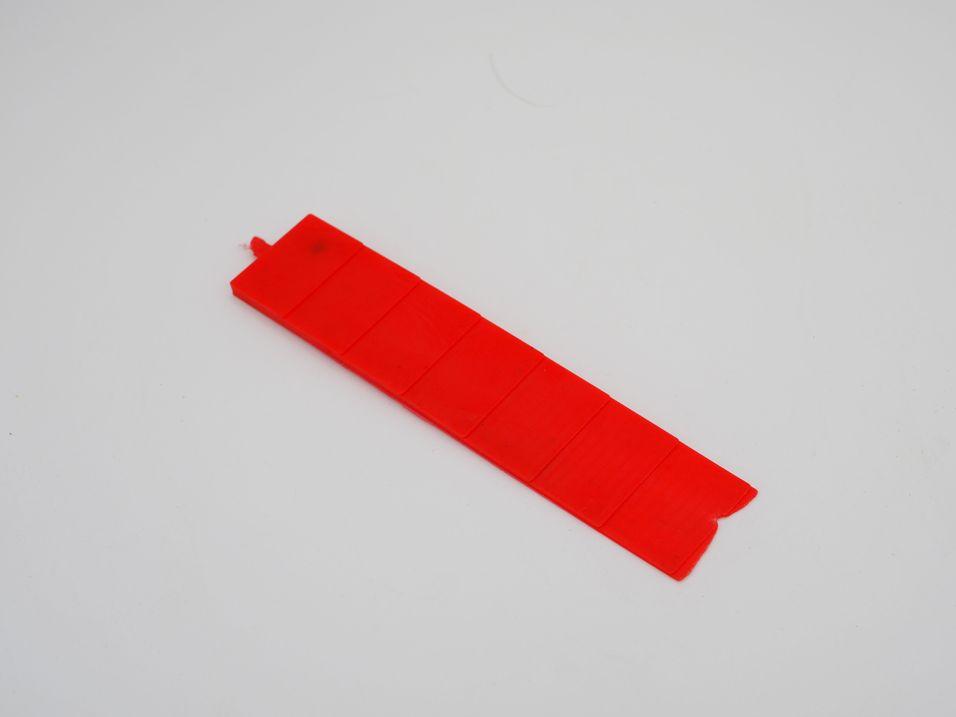
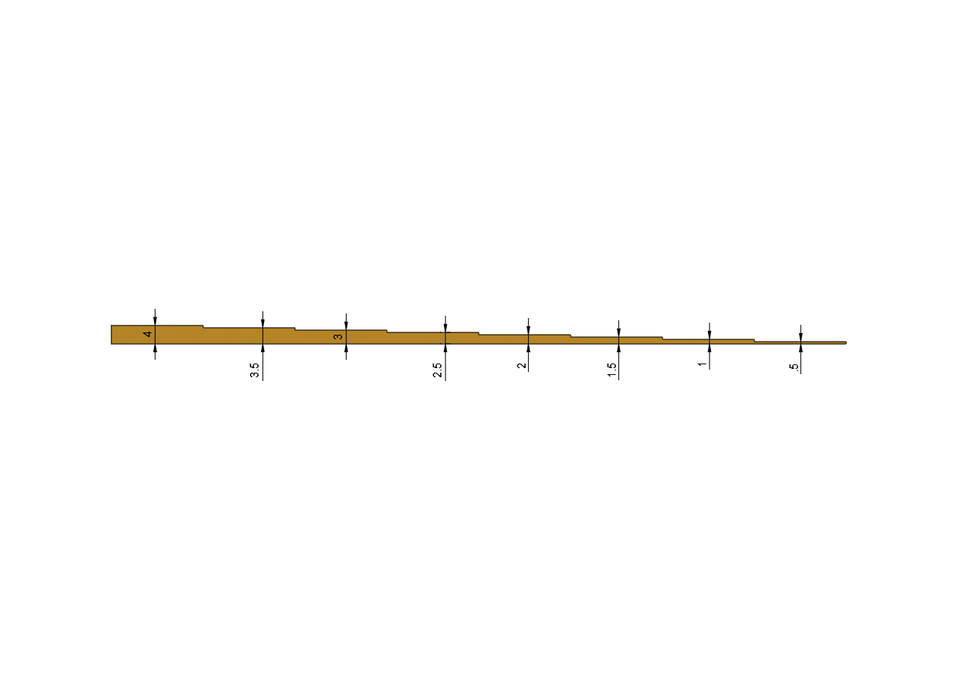
The thickness test is the long, stepped, rectangle. The thickest part of the rectangle is 4mm and the thinnest part is 0.5. Each step on the rectangle changes thickness by 0.5 mm.
This test is extremely useful for finding out the limitations of different plastics when it comes to the minimum cavity thickness.
All you need to do is measure the thinnest section that was fully injected and that is your result.
Our benchmark results: 1mm
*This mould requires a pneumatic powered injection machine (like the Sustainable Design Studio Injection Mini Machine https://bazar.preciousplastic.com/machines/injection/injection-kits/injection-mini-automatic-injection-kit-pre-order-discount). If you're using a lever or man powered injection machine, the results will be inaccurate and unusable.
5
Flexural Bending Test
The Flexural Bending Test evaluates a material’s ability to resist deformation under load. A specimen is supported at both ends and loaded in the centre until it bends or breaks, revealing its flexural strength and stiffness.
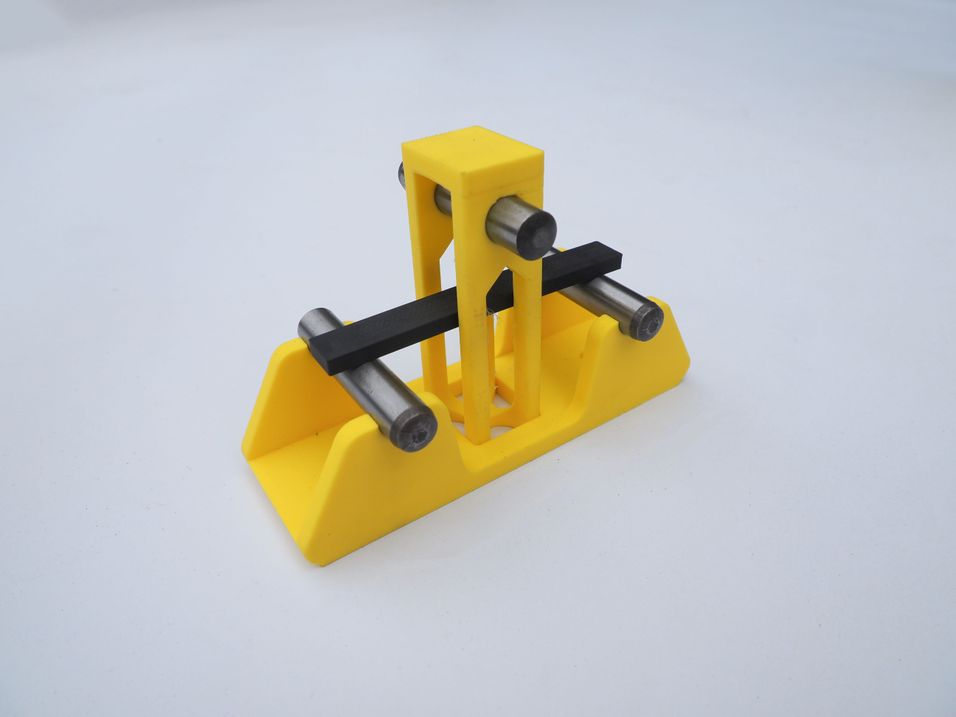
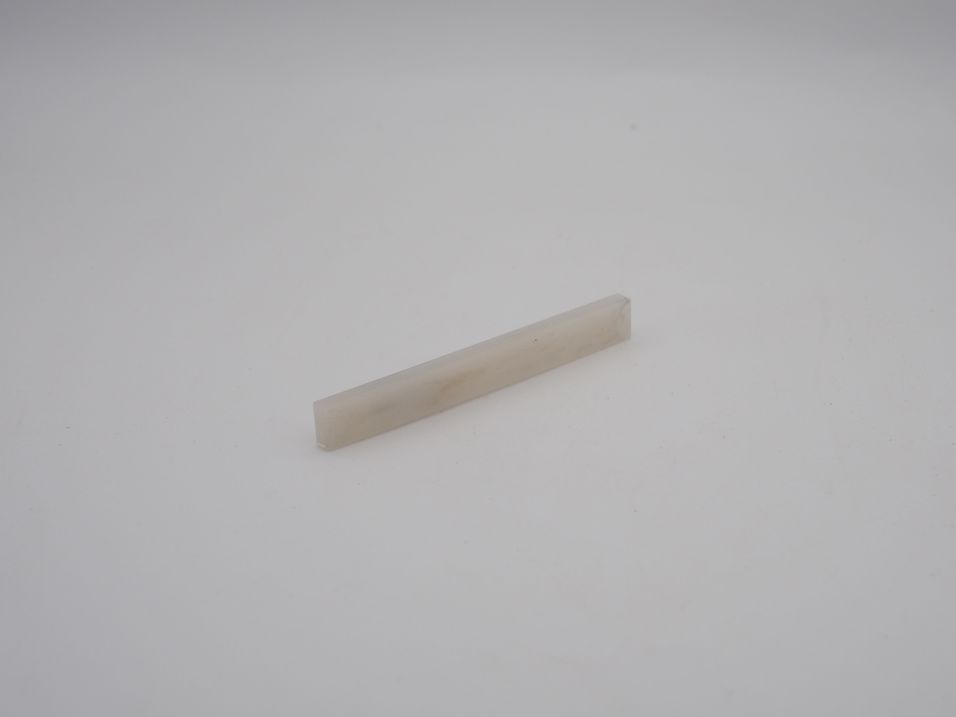
6
Heat Deflection Temperature
The Heat Deflection Temperature (HDT) test measures the temperature at which a polymer or plastic deforms under a specific load. It helps determine a material’s thermal resistance and suitability for high-heat applications
For this test, you will need to resin print the provided stand. We recommend printing this in a high-temp resin such as Phrozen TR300 Ultra High Temp Resin (This is our favourite high temp resin as in our testing this has worked the best).
Once you have the stand, simply place on the specimen and gradually heat it until it deflects by 10mm (until it touches the base of the stand). Once this is done, take a note of the temperature and that is your result.
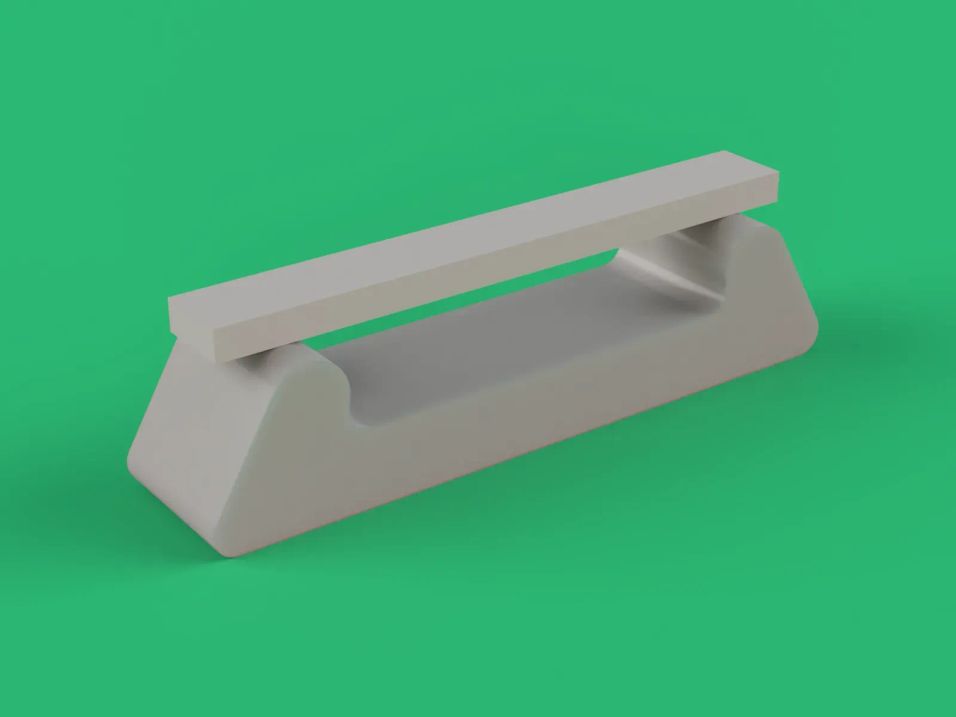
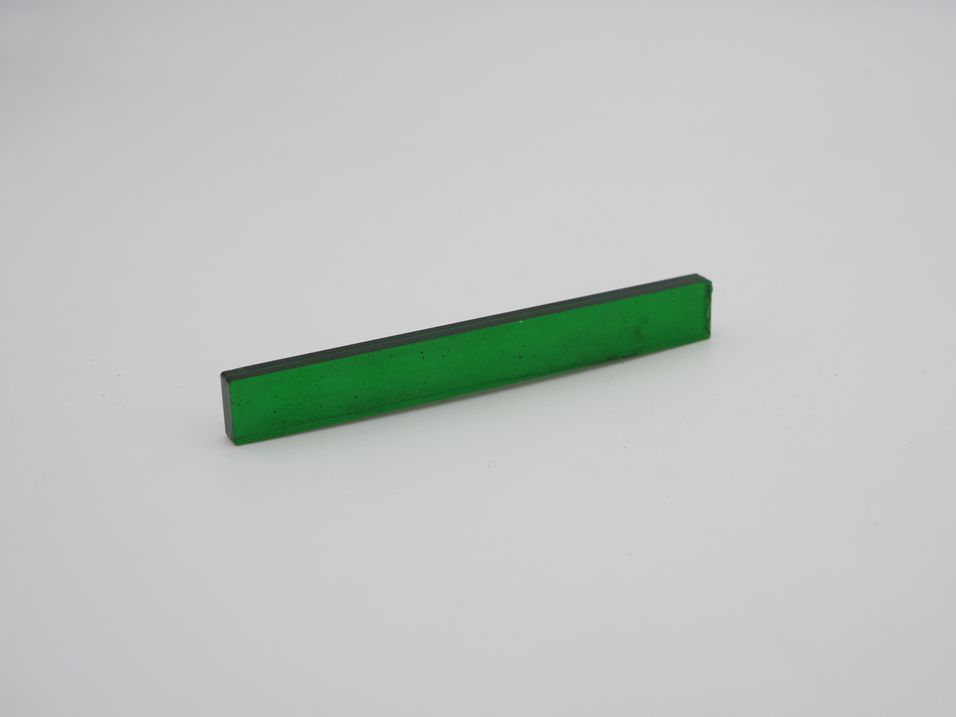
7
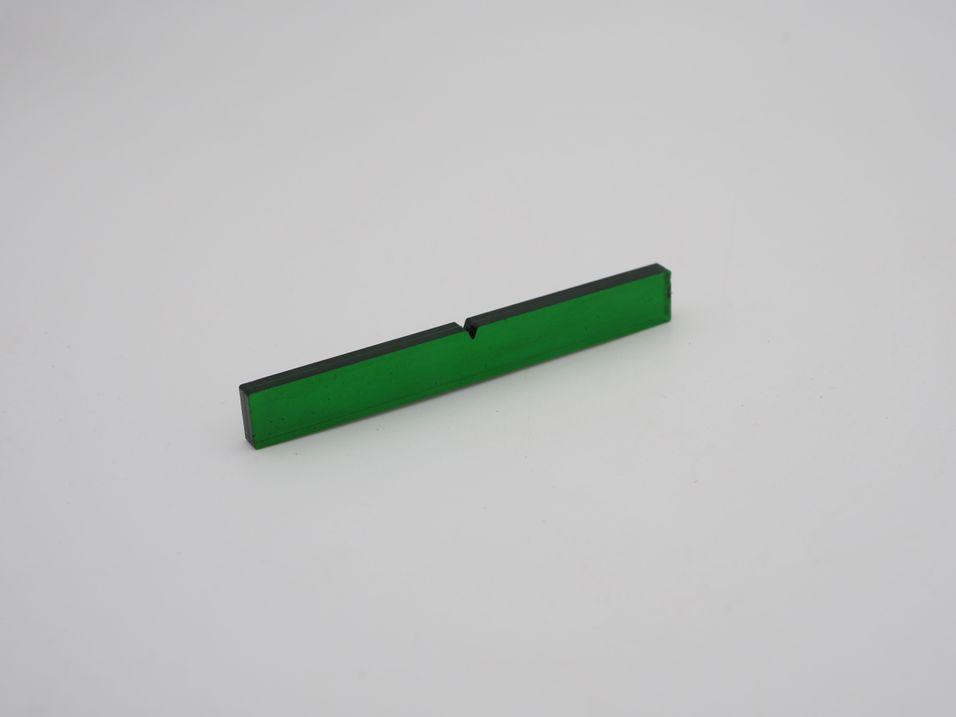
Impact Strength Test
The Impact Strength Test measures a material's ability to resist fracture under sudden applied force or shock loading. It evaluates the toughness of a material by determining the amount of energy it can absorb before breaking. This test helps assess how materials behave under dynamic or high-strain-rate conditions.
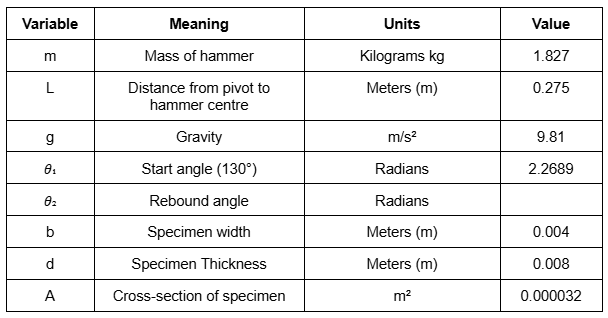
For this test, some maths is required to get your answer, but fret not, we have done all the hard work for you!
Simply pull the hammer up to the right until it is reading 130° and then let it go.
Check the photos on the right, there's a table with almost all the information. All you need to do is fill in the rebound angle!
Step 1- Calculate energy absorbed
E = m x g x L x (cosθ₂ - cosθ₁)
E = 1.827 x 9.81 x 0.275 x (cosθ₂ - (-0.6428))
Step 2- Calculate Impact Strength
Impact Strength (J/m²) = E/A
Impact Strength (J/m²) = E/0.000032
Step 3- Convert to kJ/m²
Impact Strength (J/m²) / 1000 = Impact Strength (kJ/m²)
Our benchmark results:77.5 kJ/m²

8
Making a Material Datalog
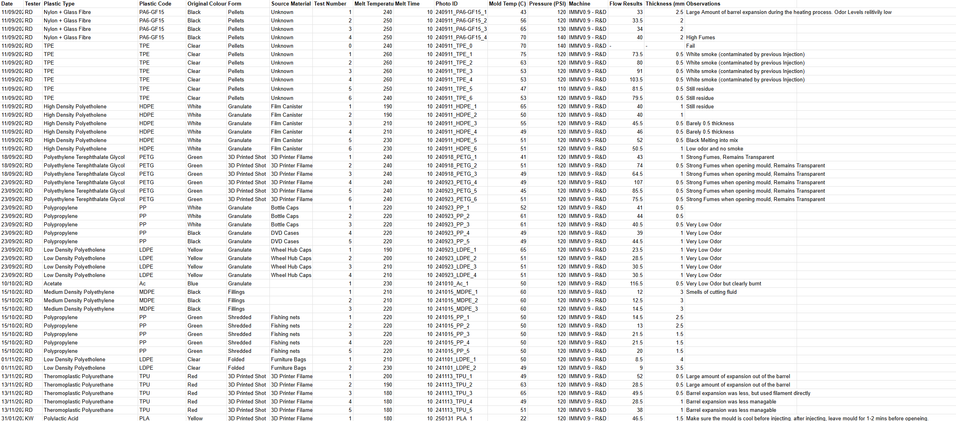
Once you have all the results, we suggest creating a Material Datalog to store them in for future reference.
The Material Datalog should have 16 columns:
Date
Plastic type
Colour
Form
Source
Test Number
Melt Temperature
Melt Time
Mould Temp
Pressure
Machine
Flow results
Thickness results
Impact results
Flexural Results
Heat deflection results
We suggest doing around 5 tests per plastic type, this way you're able to hopefully get a fairly accurate average score for the plastic. Make sure to keep the pressure and melt time exactly the same on all of your testing. Try your best to keep the mould around 50°C for all of your testing.
*Ensure to take a picture of each test that has been done and name them following this simple layout-
DATE_MATERIAL_TESTNUMBER
For example, 250620_PP_1, is the first Polypropylene test done on the 20th June 2025
9
Let us here your results!
At Sustainable Design Studio, we're continually expanding our Material Database, and we believe collaboration is key to progress. If you've conducted material testing and achieved consistent results, we'd love to connect, share data, and exchange findings with you.
Let’s work together toward smarter, more sustainable design.
Happy recycling!
%20--%3e%3csvg%20version='1.1'%20id='Layer_1'%20xmlns='http://www.w3.org/2000/svg'%20xmlns:xlink='http://www.w3.org/1999/xlink'%20x='0px'%20y='0px'%20viewBox='0%200%2064%2063'%20style='enable-background:new%200%200%2064%2063;'%20xml:space='preserve'%3e%3cstyle%20type='text/css'%3e%20.st0{fill:%2320B7EB;}%20.st1{fill:%23E9475A;}%20.st2{fill:%23FECE4E;}%20%3c/style%3e%3cdesc%3eCreated%20with%20Sketch.%3c/desc%3e%3cg%20id='Page-1'%3e%3cg%20id='OA-Logo-Black-Background'%3e%3cpath%20id='Shape'%20class='st0'%20d='M14.1,30.1c-1.5-0.8-8.6-3.8-14.1-7.8c1.8-3.4,3.1-5.6,5-9.1c2.7,1.1,1.9,0.5,4.6,1.7%20c0.8,0.4,10.1,4.5,13.8,6.2c2.4,1.1,4.7,2.2,7,3.3L43,30.5l8.1,3.9c4,2,7.2,3.5,11.3,5.5c0.5,0.3-3.7,9.4-3.7,9.4%20c-1.7-0.6-3.9-1.8-5.5-2.5c-4.7-2.1-9-3.9-13.7-6c-4-1.8-6.7-2.9-10.8-4.5C25,34.9,17.1,31.6,14.1,30.1z'/%3e%3cpath%20id='Shape_1_'%20class='st1'%20d='M12.1,54.9c-0.8,0.6-1.6,1.2-2.5,1.6c-0.4-0.5-0.9-1-1.3-1.5c-0.3-1.2-2.3-4.9-2.7-6.2%20c-0.1-0.4-0.7-2.2-0.8-2.6c0,0,5-3.4,8.2-5.9c3.2-2.6,6.2-5,9.3-7.5c1.4-1.1,3.9-2.5,5.3-3.5c2.5-1.7,13-9.1,15.6-10.5%20c5.4-3.3,11.1-6.3,16.8-9c1.7,3.5,1.8,3,3.8,6.9c0,0-17.8,13.5-22.7,17.1c-3.8,2.8-7.5,5.7-11.3,8.5c-1.7,1.3-3.5,2.4-5.2,3.7'/%3e%3cpath%20id='Shape_2_'%20class='st2'%20d='M20.8,2.9l-0.2-0.8C25,0,31.2-0.3,31.4,0.2c0.4,1.1,0.9,2.2,1.2,3.4c1.4,4.4,2.7,8.7,4,13.1%20c0.4,1.4,2.8,10,2.9,10.5c0.5,2.8,1.2,5.6,1.6,8.4c0.8,4.7,1.4,8.6,2.3,13.3c0.6,3.1,1.3,6.3,2.3,11.3c0,0-5.8,1.4-7.5,1.8%20c-0.8,0.2-1.5,0.4-2.4,0.6c-0.3-1.1-0.2-1.2-0.5-2.1c-0.9-3.7-1.8-7.3-2.6-11c-1.5-6.4-3-12.9-4.4-19.3%20c-1.2-5.4-2.6-10.7-4.4-15.9c-1-3.1-1.8-6.3-2.7-9.5C21.1,3.8,21,3.8,20.8,2.9z'/%3e%3c/g%3e%3c/g%3e%3c/svg%3e)